Accidentally deleting an important file is something most Mac users have experienced. Whether it’s a critical work document, personal photo, or video file, the feeling of losing data can be overwhelming. That’s where Stellar Data Recovery for Mac steps in. In this review, I tested the full-featured Professional version to see how well it performs and whether it’s worth the price.
Pricing
The Professional version for Mac is priced at $89, although I was able to find a 10% discount on the official website. You can purchase a license here:
https://www.stellarinfo.com/disk-recovery/mac-data-recovery/buy-now.php
According to the website, the Professional version includes the following features:
- Data Recovery
Recovers lost, deleted, and formatted data. Restore files from formatted hard drives. - Recover Data from Any Storage Media
Restore files from hard drives, USB drives, flash drives, and other removable media. - Pause & Resume Scan
Preview and recover files while the scan is in progress using the new ‘Pause & Resume’ feature. - Fragmented Video Recovery
Recover fragmented MOV and MP4 video files saved on removable drives and memory cards. - Supports 300+ Types of Files
Supports over 300 file types by default. You can also add more file types for recovery. - Get Back Deleted Emails
Recovers Apple Mail (sent and draft messages). - Deep Scan for Best Recovery Results
Performs deep scans to recover up to 100% of lost files. - T2, M1, M2, M3 Chips Support
Compatible with T2, M1, M2, and M3 chips without disabling SIP or installing KEXTs. - Lost Volume Recovery
Recover data from deleted or lost volumes. - Unbootable Hard Drive Recovery
Recover data from unbootable or crashed Macs. - Create Disk Image
Create disk images for faster and safer file recovery. - Raw Recovery
Recover data from RAW or severely corrupted storage drives. - Optimize Mac
Optimize your Mac for speed with cleanup, duplicate finder, and scheduler features for smoother performance.
Considering the range of features, I believe the pricing is reasonable, especially given that it includes system optimization tools as well.
System Setup
For this review, I used a MacBook Air running macOS Big Sur with the following specs:
- 1.4 GHz Dual-Core Intel Core i5
- 4GB 1600 MHz DDR3 RAM
Installation
The installation process was straightforward. I downloaded the disk image from the Stellar website, opened it, and dragged the application into the Applications folder. Launching the app was as simple as double-clicking the icon.
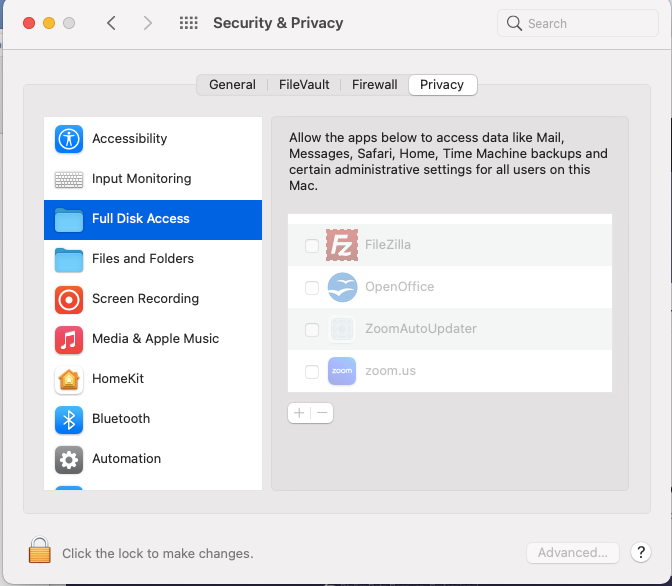
If you’re planning to recover files from your Mac’s internal drive, you’ll need to grant Stellar Data Recovery full access. This can be done by going to System Preferences > Security & Privacy > Full Disk Access. Click the padlock in the lower-left corner, enter your admin password, and enable access for StellarDataRecovery.

In my case, since I was recovering files from an external drive, this step wasn’t necessary. It’s also worth noting that Stellar can recover data from encrypted drives, provided you have the password.
Test Files Used
For testing purposes, I created and deleted three files from an external drive:
- A Microsoft Word document
- A video file (MP4)
- An image file (PNG)
Stellar Data Recovery also supports recovery of email files, audio files, and photos.

Using the Application
When I launched the application, I was greeted by a modern, clean interface. It’s very user-friendly and easy to navigate for both beginners and experienced users.
The home screen lets you choose the type of files you want to recover:
- Documents
- Emails
- Videos
- Audio
- Photos
- Recover Everything
You can select “Recover Everything” to scan for all file types or customize your selection. Once you’ve made your choices, click “Next” to proceed.

On the following screen, select the drive you want to scan for deleted files. In my case, I chose the external USB drive.

The scan took about five minutes to complete, though scan time can vary based on drive size. Once finished, I was taken to the recovery results screen. The interface includes three tabs on the left:
- Classic List
- File List
- Deleted List
Navigating through the folders was easy, and clicking on any file showed a preview, which is a helpful feature to confirm what you’re recovering.

Recovery Results
As expected, the three test files I had deleted appeared in the Deleted List. I selected the files, clicked “Recover,” and was prompted to choose a destination folder. I selected my Downloads folder and let the process run.
Within minutes, all three files were successfully recovered, intact, and functional.

Bonus Feature: Speed Up Mac
One feature I didn’t expect, but found incredibly useful, was “Speed Up Mac.” It’s available directly from the app’s home screen.
My MacBook Air is a bit older, so I decided to give it a try. After clicking the large “Clean” button, the app scanned for junk files, system clutter, and unnecessary data. It cleaned everything up, and I noticed a slight but definite improvement in performance. This is a great add-on feature that makes the software even more useful.

Final Verdict: 9.5/10
Stellar Data Recovery for Mac is a highly capable, user-friendly tool for recovering deleted or lost files. The interface is intuitive, the recovery process is simple, and it supports a wide range of file types and devices. Whether you’re a beginner or an IT professional, this tool is easy to use and effective.
While the scanning speed could be improved, the software’s strengths—such as file preview, support for encrypted and unbootable drives, and extra optimization tools—make it well worth the price. If you need a reliable, all-in-one recovery solution for macOS, Stellar Data Recovery Professional is a solid choice.
Summary:

//By Abe Wakama