• Business
  • Markets
  • Politics
  • Crypto
  • Finance
  • Intelligence
    • Policy Intelligence
    • Security Intelligence
    • Economic Intelligence
    • Fashion Intelligence
  • Energy
  • Technology
  • Taxes
  • Creator Economy
  • Wealth Management
  • LBNN Blueprints
  • Business
  • Markets
  • Politics
  • Crypto
  • Finance
  • Intelligence
    • Policy Intelligence
    • Security Intelligence
    • Economic Intelligence
    • Fashion Intelligence
  • Energy
  • Technology
  • Taxes
  • Creator Economy
  • Wealth Management
  • LBNN Blueprints

Google brings a variation on ‘Circle to Search’ to iPhone users

Simon Osuji by Simon Osuji
May 8, 2024
in Creator Economy
0
Google brings a variation on ‘Circle to Search’ to iPhone users
0
SHARES
2
VIEWS
Share on FacebookShare on Twitter

Google has found a way to bring a variation of its clever “Circle to Search” gesture to iPhone users. The new interaction, launched in January, allows Android users to search from anywhere on their device by circling, highlighting, scribbling or tapping, making it easier to engage with Google Search from any screen. Of course, a similar option has not been available to iPhone users, as Google doesn’t control the iOS operating system as it does on Android. To work around this problem, Google is now using Apple’s Action Button on iPhone 15 Pro devices to enable a quick way to visually search anything on your screen with just a press of a button. 

No longer a simple ring/silent switch, the Action Button allows users to customize the functionality of the iPhone’s side button to their own needs. It can be configured to launch the camera, translate a conversation, enable a Focus mode, launch the Flashlight and more. Or, users can assign a Shortcut of their own to the Action Button to start another task, like kicking off a ChatGPT voice session, for example. 

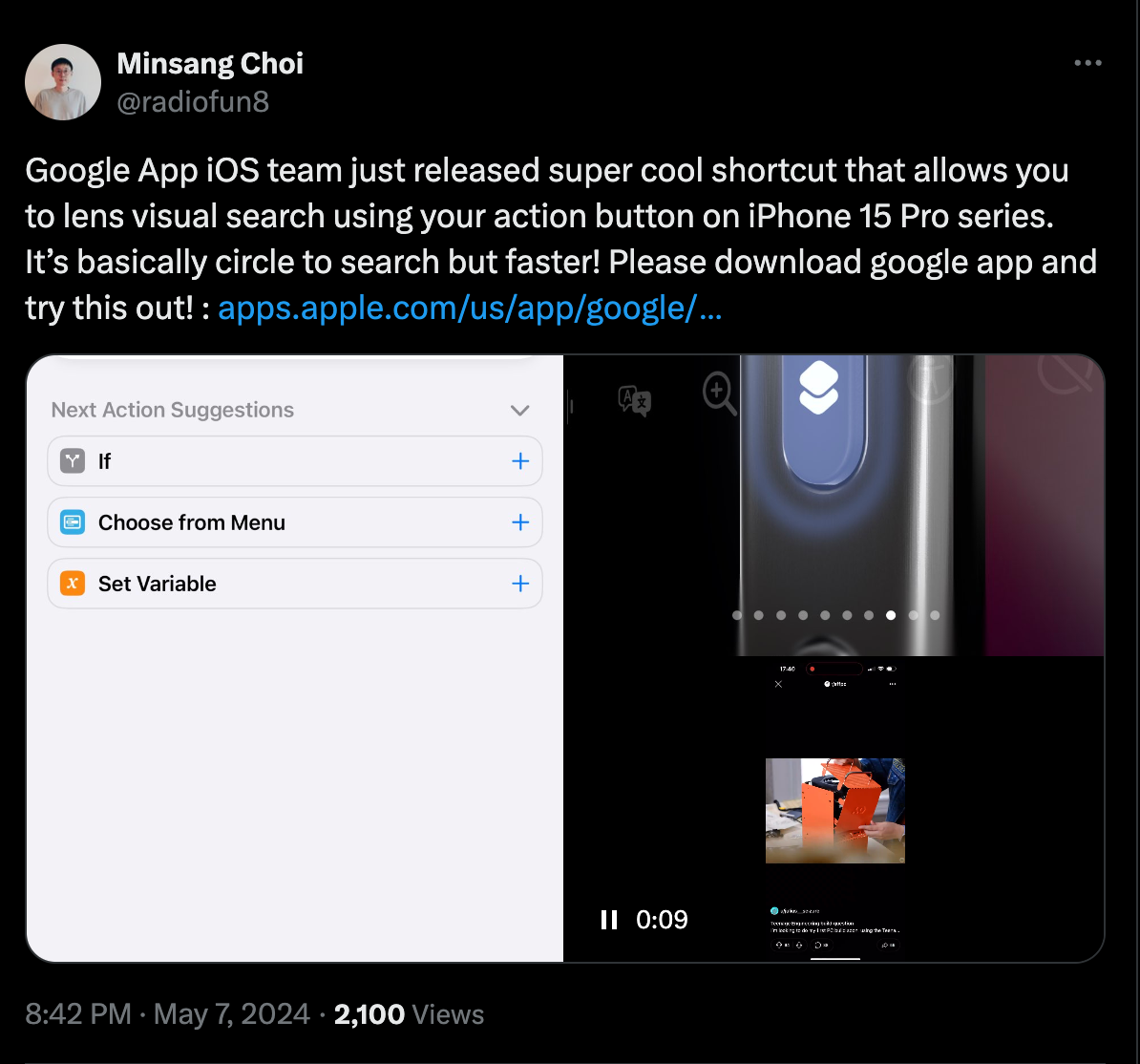
In Google’s case, the company has launched a shortcut that lets iPhone users start a visual search via Google Lens. 

“It’s basically circle to search but faster!,” noted Google Lens design manager Minsang Choi in a now deleted post on X, where he introduced the shortcut created by the Google App iOS team. (Apparently, this was an unapproved release. We’ve asked Google for comment on the takedown.)

Image Credits: Screenshot from X

While Google’s iOS app already offers a way to use Lens for visual search, the addition of the shortcut makes it easier to start a search with a simple gesture, similar to Android. However, it also highlights the difficulties involved with trying to innovate new ways to interact with technology when building for iOS: a workaround had to be used in place of offering a gesture.   

To use the shortcut, iPhone users will need to have the Google app for iOS installed and then they’ll need to download the shortcut and assign it to the Action Button from iOS’s Settings. Although Choi’s link to the shortcut has been pulled, there’s still a way to make one.

From the iOS Shortcuts app, create a shortcut that first takes a screenshot and then performs the action “Search Image with Lens,” as shown in the example below. This essentially mimics the Circle with Search feature but uses Google Lens on iPhone.

9to5Mac, which was the first to spot the release, also noted there’s a way to configure the Accessibility feature Back Tap to launch the new shortcut instead if you aren’t using an iPhone 15 Pro device. 

Image Credits: Screenshot of iOS Shortcuts app

Related posts

Google Search rolls out Gemini’s Canvas in AI Mode to all US users

Google Search rolls out Gemini’s Canvas in AI Mode to all US users

March 4, 2026
MacBook Neo, iPhone 17e, and everything else Apple announced this week

MacBook Neo, iPhone 17e, and everything else Apple announced this week

March 4, 2026

Source link

Previous Post

Benin’s W National Park Becomes ‘Headquarters’ for Terrorists

Next Post

Infrastructure development hinges on leadership, says Cesa CEO

Next Post
Infrastructure development hinges on leadership, says Cesa CEO

Infrastructure development hinges on leadership, says Cesa CEO

Leave a Reply Cancel reply

Your email address will not be published. Required fields are marked *

RECOMMENDED NEWS

Rebels Target Niger Junta’s Oil Revenue

Rebels Target Niger Junta’s Oil Revenue

3 weeks ago
New Innovative AI Tools to Transform Retail – IT News Africa

New Innovative AI Tools to Transform Retail – IT News Africa

2 years ago
Transnet Concludes Wage Agreement With Its Recognised Labour Unions

Transnet Concludes Wage Agreement With Its Recognised Labour Unions

9 months ago
Top Republican calls for 340B reform in long-awaited investigation

Top Republican calls for 340B reform in long-awaited investigation

10 months ago

POPULAR NEWS

  • Ghana to build three oil refineries, five petrochemical plants in energy sector overhaul

    Ghana to build three oil refineries, five petrochemical plants in energy sector overhaul

    0 shares
    Share 0 Tweet 0
  • Mahama attends Liberia’s 178th independence anniversary

    0 shares
    Share 0 Tweet 0
  • The world’s top 10 most valuable car brands in 2025

    0 shares
    Share 0 Tweet 0
  • Top 10 African countries with the highest GDP per capita in 2025

    0 shares
    Share 0 Tweet 0
  • Global ranking of Top 5 smartphone brands in Q3, 2024

    0 shares
    Share 0 Tweet 0

Get strategic intelligence you won’t find anywhere else. Subscribe to the Limitless Beliefs Newsletter for monthly insights on overlooked business opportunities across Africa.

Subscription Form

© 2026 LBNN – All rights reserved.

Privacy Policy | About Us | Contact

Tiktok Youtube Telegram Instagram Linkedin X-twitter
No Result
View All Result
  • Home
  • Business
  • Politics
  • Markets
  • Crypto
  • Economics
    • Manufacturing
    • Real Estate
    • Infrastructure
  • Finance
  • Energy
  • Creator Economy
  • Wealth Management
  • Taxes
  • Telecoms
  • Military & Defense
  • Careers
  • Technology
  • Artificial Intelligence
  • Investigative journalism
  • Art & Culture
  • LBNN Blueprints
  • Quizzes
    • Enneagram quiz
  • Fashion Intelligence

© 2023 LBNN - All rights reserved.